Share this article! Here's a short link you can use: http://im.vu/help1045
Important Update About NFTs
Starting January 30, 2026, IMVU will be removing the blockchain component from NFTs and rebranding all existing NFTs as Limited Edition (LE) products. With this change, these items will no longer exist on the blockchain and will instead be fully supported as Limited Edition digital products within the IMVU platform, retaining their exclusivity and in-platform value while aligning with our current product ecosystem.
You can purchase Limited Edition (LE) products with VCOIN in two ways:
- From the Limited Edition (LE) category in the Shop.
- Select a user in a Live Room on IMVU Mobile who is wearing and selling an LE product.
You can only buy one LE product at a time. You cannot gift LE items, but you can gift VCOIN.
LE products are rare, collectible items with a set quantity, and no more of that specific design will be made afterward.
When buying LE products, the lowest-priced items in the set will be displayed. You can only own one item from an LE set at a time.
If the specific LE product you are purchasing becomes unavailable before you finish your purchase, you will have the option to purchase an identical LE product from the same collection at the same price.
Buying Limited Edition (LE) products in the Shop on IMVU Mobile
Step 1: Go to the Limited Edition (LE) category in the Shop. You can filter by LE products and find LE items based on their gold Limited Edition (LE) badge and VCOIN price.
Step 2: Tap the LE product you’re interested in purchasing to try it on, then scroll down to read the description, total quantity, attributes, sales history, and other details. Click Buy Now to go to the checkout page.
Step 3: Once you’ve purchased your LE product, you will receive a confirmation message, a receipt in your VCOIN Wallet, and a message once your LE item is available in your inventory to wear.
Buying Limited Edition (LE) Products in a Live Room on IMVU Mobile
Step 1: While in a Live Room, click an avatar with an LE badge next to their name, which means they own and are wearing at least one LE product. Tap View Limited Edition (LE) to see what product they are wearing.
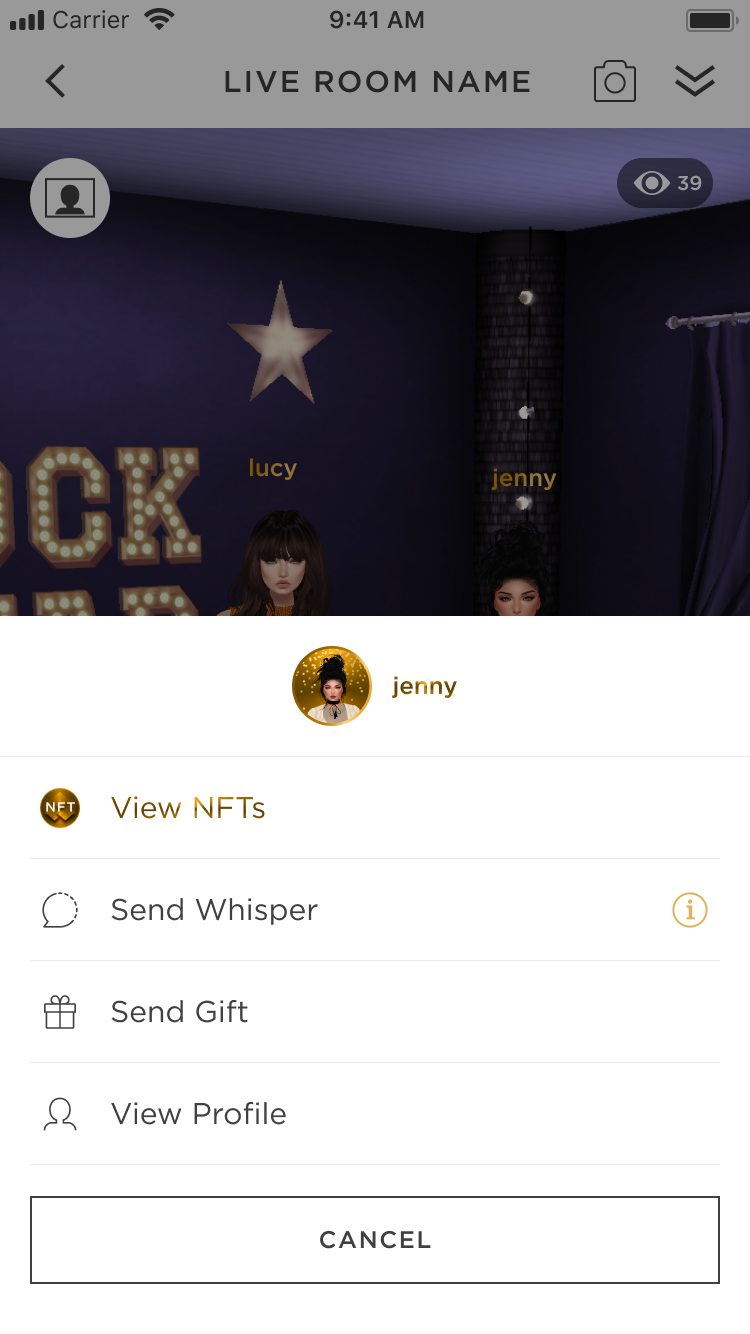
Step 2: Tap the LE product you’re interested in purchasing to try it on, then scroll down to read the description, total quantity, attributes, sales history, and other details. Click Buy Now to go to the checkout page if the LE product you want is listed for sale.
Step 3: Once you’ve purchased your LE product, you will receive a confirmation message, a receipt in your VCOIN Wallet, and a message once your LE item is available in your inventory to wear.
Buying Limited Edition (LE) products in the Shop on IMVU Desktop
Step 1: Go to the Limited Edition (LE) category in the Shop. You can filter by LE products and find LE items based on their gold LE badge and VCOIN price.
Step 2: Click the LE product you’re interested in purchasing to try it on, then scroll down to read the description, total quantity, attributes, sales history, and other details. Click Buy Now to go to the checkout page.
Step 3: Once you’ve purchased your LE product, you will receive a confirmation message, a receipt in your VCOIN Wallet, and a message once your LE item is available in your inventory to wear.
My state or country does not allow me to buy/withdraw VCOIN. If someone gifts me VCOIN, can I use that to buy and resell Limited Edition (LE) products?
Yes. You are only restricted from buying or withdrawing VCOIN, but if it’s gifted to you, you can use it to buy LE products. You will also have the option to resell that LE product.
Note: If you resell an LE product, the VCOIN you will receive from that sale cannot be withdrawn through Uphold. See the complete list of states and countries restricted in purchasing and withdrawing VCOIN here.
Learn more about Limited Edition (LE) Products! |
Was this article helpful?
That’s Great!
Thank you for your feedback
Sorry! We couldn't be helpful
Thank you for your feedback
Feedback sent
We appreciate your effort and will try to fix the article